
Route decisions, approvals, reviews, exceptions, and handoffs through controlled workflows.
Operations and IT command centers
AI Workflow Automation Command Center
A governed workflow automation layer for intake, triage, approvals, task routing, exception handling, integrations, and operational follow-through across enterprise processes.
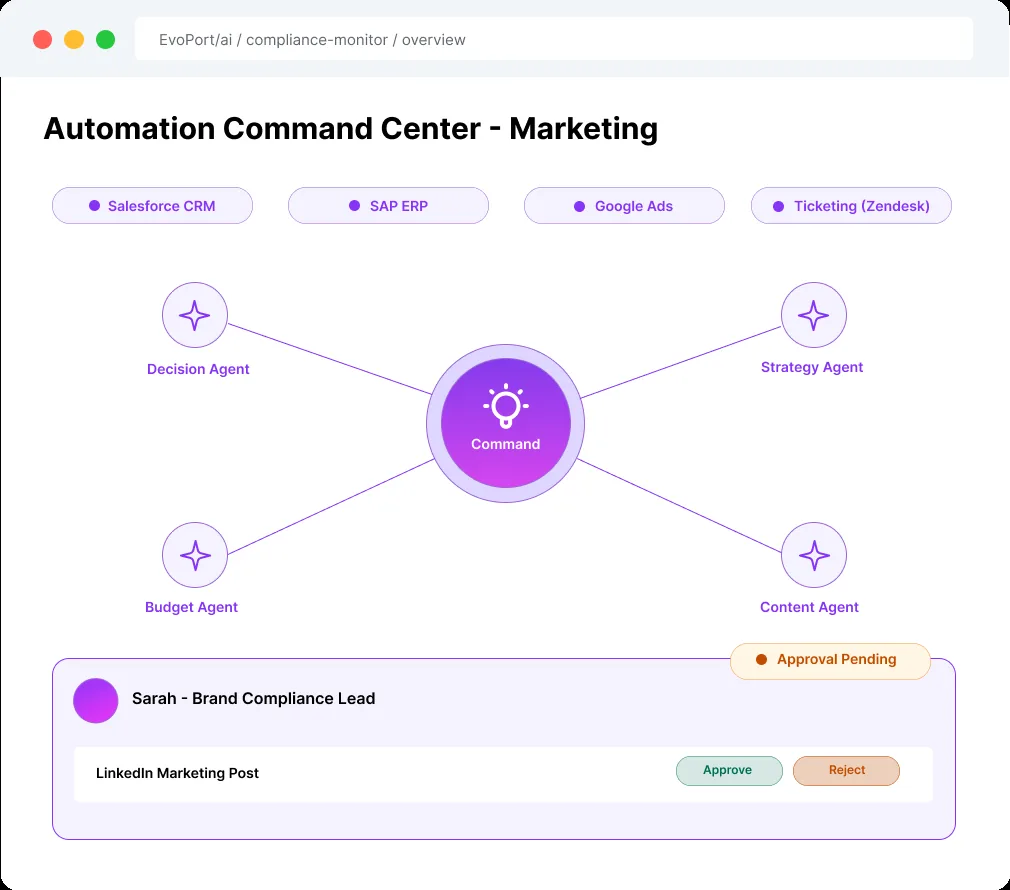
AI Workflow Automation Command CenterIllustrative product mockup; sample data and capabilities vary by implementation.
Core capabilities
What Nebula9 builds into this solution.
Each solution combines the capabilities, integrations, controls, and operating design needed for the workflow.
Coordinate monitoring, analysis, recommendation, routing, and resolution as one operating system.
Pause consequential actions until the authorized reviewer accepts, changes, or rejects them.
Send a blocked item to the responsible queue with its cause, evidence, and escalation deadline.
Show approaching deadlines and overdue work against the service targets agreed for that workflow.
Coordinate approved handoffs across systems and record retries, failures, and recovery ownership.
Connect the systems where the work already happens.
Nebula9 maps source quality, permissions, refresh cadence, and review ownership before scaling the workflow.
Workflow toolsCRMERPTicketing systemsEmailDocumentsAPIsData warehouses
Illustrative examples
How the workflow could fit different teams.
These are example applications, not claims of completed client deployments. Data sources, automation boundaries, and success measures are agreed for each implementation.
Coordinates onboarding, document review, exception handling, and approval follow-up across risk and operations teams.
Routes intake, evidence collection, review, and escalation workflows without losing human oversight.
Connects quality, supplier, maintenance, and production exceptions into one controlled operating queue.
What the first useful output could look like.
This example explains the proposed workflow, not a measured client result or a promise of a prebuilt integration.
- Starting point
- An approval request is stuck between email and a work queue.
- Output to evaluate
- One tracked item shows the evidence, current owner, deadline, and next permitted action.
- Human decision
- The authorized owner approves the action or routes an exception; the system records the handoff.
Confirm sources, permissions, supported integrations, test cases, and acceptance criteria during scoping.
Workflow architecture
Design the solution as an operating workflow, not a standalone AI tool.
A governed workflow automation layer for intake, triage, approvals, task routing, exception handling, integrations, and operational follow-through across enterprise processes.
Trigger and workflow
Define the event, user, queue, decision, or operating cadence that makes the solution valuable.
Data and intelligence
Connect trusted systems, documents, metrics, context, and retrieval paths behind the workflow.
Human review and governance
Add approvals, escalation, policy checks, access control, and audit evidence where needed.
Action and measurement
Route the result into work queues, apps, reports, service actions, or operating reviews.
EvoPort fit
Use EvoPort when this solution must be governed, repeated, and operated.
EvoPort supports reusable apps, specialist agents, approvals, audit trails, workflow execution, observability, and rollout controls after Nebula9 designs the operating model.
Explore EvoPort.ai- Apps and specialist agents tied to the workflow.
- Approvals, access, review gates, and audit history.
- Operational visibility, exceptions, and support cadence.
- Reusable rollout patterns across teams or industries.
Outcome measures to validate
Set the baseline before measuring change.
These are candidate measures, not reported client results. Agree the baseline, calculation, owner, and review period during discovery.
Decision path
Choose the right starting point for your team.
Start AI Workflow Automation Command Center with the smallest useful workflow. Use the readiness scorecard to identify missing data, ownership, or controls before choosing a build or platform rollout.
Clarify business value, owner, data boundaries, review gates, success measures, and the smallest responsible first release.
Build the app, AI assistant, automation, analytics dashboard, integration or research workflow with safeguards built in.
Move to EvoPort when the solution needs reusable apps, agents, approvals, observability, audit history, and rollout control.
Define support, quality review, exception handling, release cadence, value tracking, and backlog ownership after launch.
FAQ
Common questions
How does this fit with our existing tools?
It brings information, review steps and follow-up tasks into one connected workflow. We assess which existing tools to retain or integrate during scoping.
Does every implementation require EvoPort?
No. Nebula9 uses EvoPort when the solution needs reusable apps, agents, approvals, observability, audit history, and repeatable rollout control.
What is the best starting point?
Start with one workflow that has clear value, known users, accessible data, review ownership, and a measurable production outcome.
Who should join the first workshop?
The business owner, process owner, technology or data owner, and any risk, compliance, or operations stakeholder who controls adoption.
Enterprise readiness
Security, governance, and procurement questions have a clear review path.
Start with the public security hub, then request the legal and technical material needed for your procurement review.
Review security postureUse the security hub to review hosting, analytics consent, data handling boundaries, and procurement questions before a formal engagement.
Nebula9 scopes workflows around access, approvals, evidence, auditability, human review, and operating ownership.
Where EvoPort is used, the platform fit conversation covers permissions, approvals, observability, audit history, and deployment model.
Formal pricing, DPA, product terms, and security questionnaires are handled through the workshop and procurement review path.
Next step
Book AI Adoption WorkshopMap the first workflow for AI Workflow Automation Command Center.
Use the workshop to define users, systems, data, review gates, platform fit, operating owner, and measurable production outcome.